CMDB-360 Nebula
An AI engine for the CMDB-360 ecosystem. Nebula learns from the assets your Base Station and Satellites have already discovered, then lets you ask questions about everything you manage in plain language — while keeping every byte of customer data private and local.
Private, local-only AI for your CMDB

Your CMDB, answerable in plain language
Nebula trains a local language model on the data CMDB-360 already holds — assets, relationships, configuration and historical metrics gathered by your Satellites. Instead of building reports and filtering tables, you simply ask. Nebula understands questions that span every customer you manage and returns a ranked, prioritized answer.
- Ask in natural language — no query syntax, filters or report builders
- Fleet-wide answers that reach across every customer and environment you manage
- Understands assets, relationships, configuration and months of historical metrics
- Ranked, prioritized results so the work that matters most rises to the top
- Surfaces conditions worth acting on — capacity pressure, drift and risk
- Opens incident and problem tickets in your ITSM automatically
- Cites the exact configuration items behind every answer it gives
- One-click deploy from the major cloud marketplaces, just like LaunchPad
AI that never lets customer data leave your control
Managed service providers carry a high bar for confidentiality — customer data simply cannot be sent to a third-party AI service. Nebula is built for that reality. It runs a local-only language model, trained and queried entirely inside your own environment, so you can put AI to work without handing data to anyone.
Local-only inference
The model lives and runs inside your CMDB-360 environment. Prompts, training data and answers stay on your infrastructure — nothing is sent to external AI providers, and there is no shared, multi-tenant cloud model learning from your customers.
Tenant boundaries respected
Nebula honors the same account separation as the Base Station and Satellite model. Discovery data stays segregated by customer, and answers are scoped to what each user is entitled to see — isolation is preserved end to end.
Because the model is trained on your own CMDB, its knowledge grows automatically as your Satellites discover more — with no data ever leaving the environment it was discovered in.
Just ask Nebula
A single question, answered across every customer you manage — ranked so the most urgent work is first.
“Which systems have been using an abnormally high amount of memory over the past three months?”
Found 4 systems across 3 customers trending above their normal memory baseline. Prioritized by severity:
| System | Customer | Avg. memory | 90-day trend |
|---|---|---|---|
app-prod-02 | Northwind | 96% | ↑ rising |
sql-cluster-a | Contoso | 91% | ↑ rising |
vmhost-esx-07 | Fabrikam | 88% | → steady-high |
web-edge-01 | Northwind | 85% | → steady-high |
Every row links back to the configuration item in CMDB-360 — and Nebula can open a ticket for any of them on the spot.
Insights become tickets — automatically
Nebula plugs straight into the ITSM ticketing system your team already runs on. When it detects a condition worth acting on, it doesn’t just tell you — it raises the right ticket, in the right queue, with the evidence attached.
Native ITSM integration
Nebula connects directly to your ITSM platform and creates incident or problem tickets, routed to the correct assignment group with the right priority.
Condition-based automation
Define the conditions that warrant attention — sustained high memory, capacity exhaustion, configuration drift — and Nebula opens a ticket the moment they are met.
Closed-loop context
Each ticket links back to the exact configuration items and the evidence Nebula used, so whoever picks it up starts with the full picture — not a vague alert.
Three steps, all inside your environment
Nebula sits alongside your Base Station and turns discovered data into answers — without a data-science project and without sending anything outside.
1 · Aggregate
Nebula draws on the assets, relationships and metrics CMDB-360 has already discovered through your Satellites — the data is there the moment it deploys.
2 · Train locally
A local language model is built and continuously refreshed inside your environment as discovery continues. No customer data is sent to any external AI service.
3 · Ask & act
Query in plain language from the Base Station portal, get prioritized answers, and let Nebula raise ITSM tickets for the conditions that warrant them.
How Nebula answers — the MCP engine
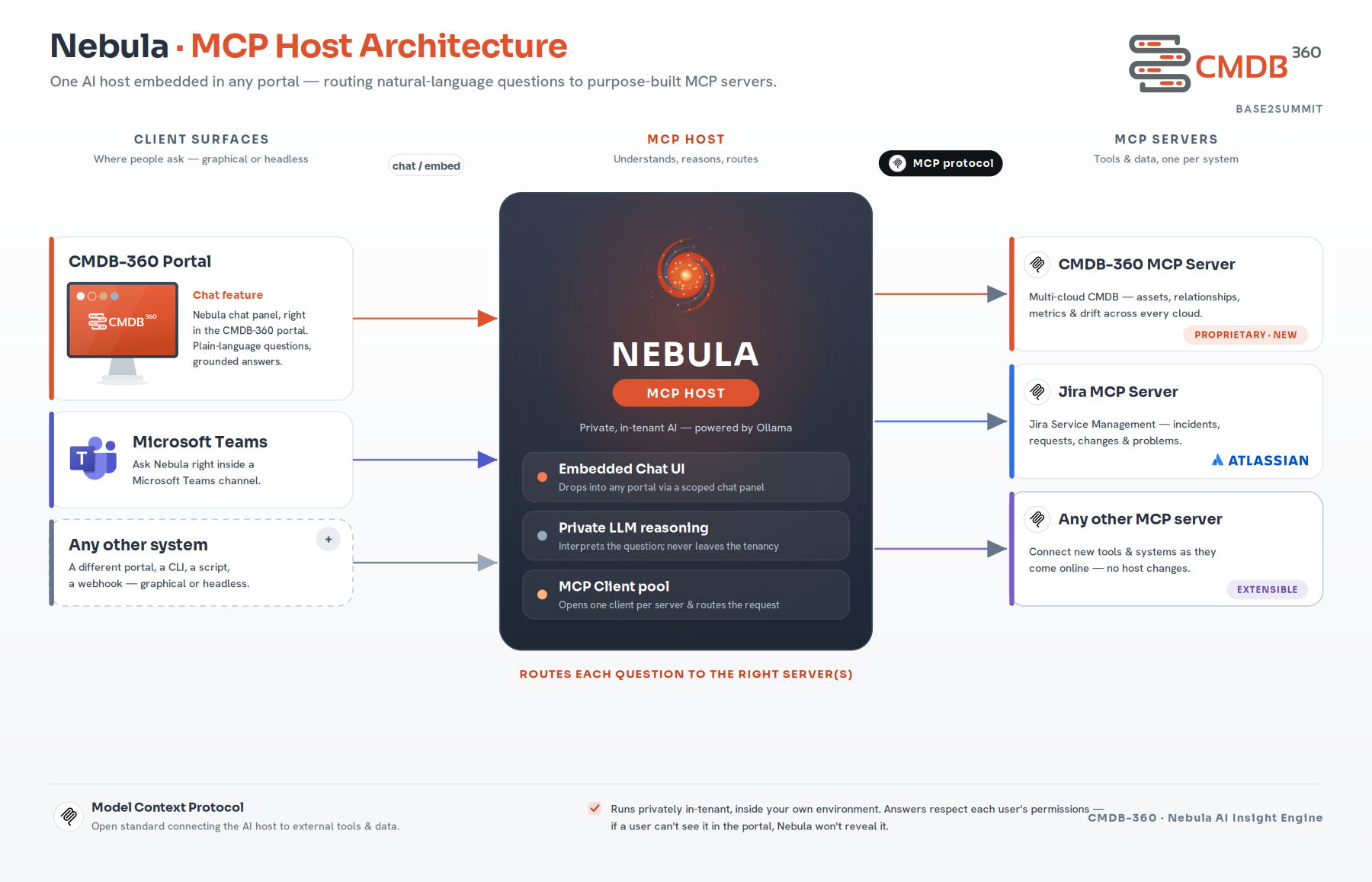
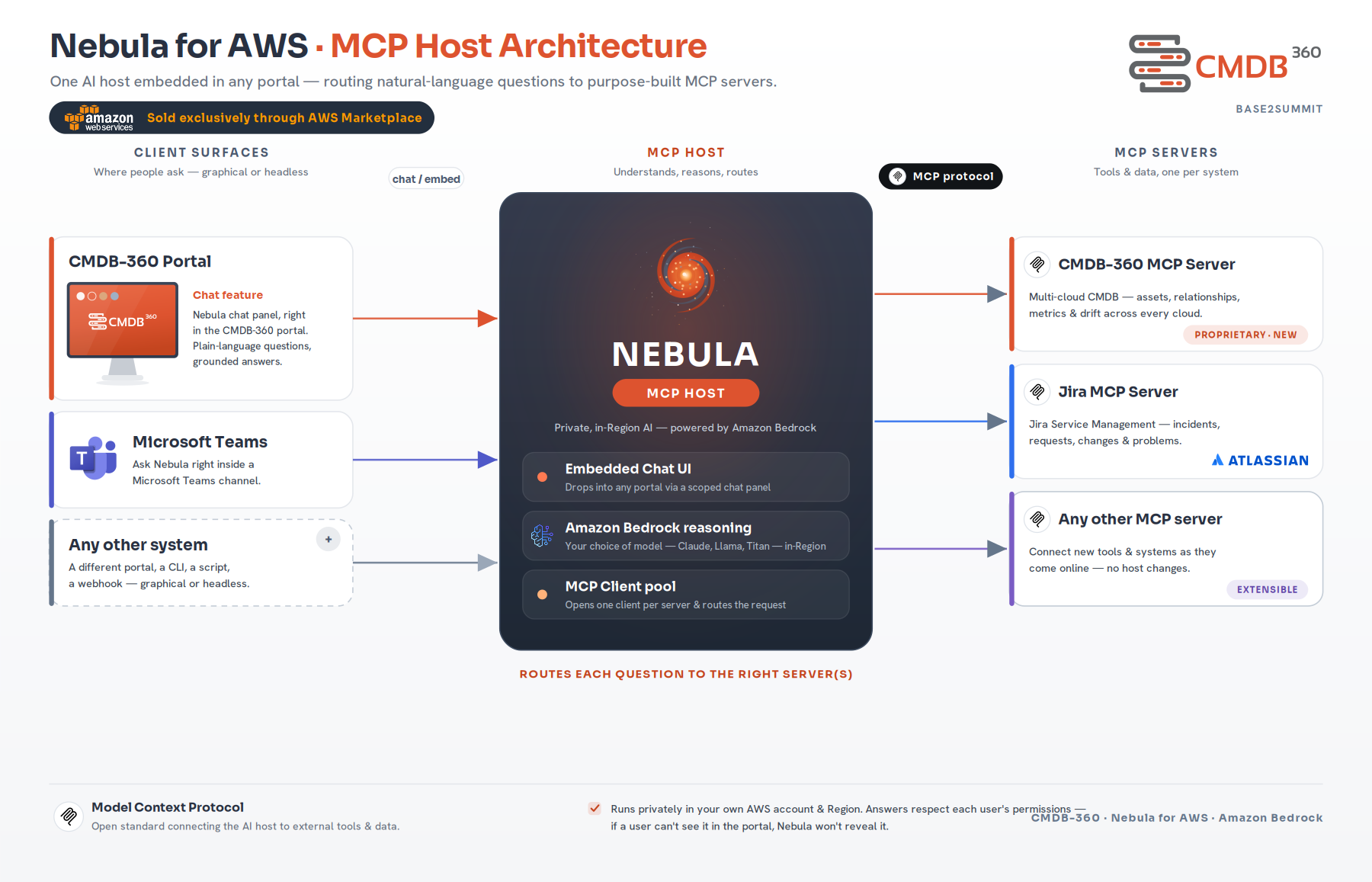
Nebula is an MCP host. It embeds a chat panel into the CMDB-360 portal, interprets each question with a language model, then routes it through purpose-built MCP servers to your CMDB and the other systems you run. One assistant reaches many tools — and new systems slot in without changing the host.
Understands
The chat panel drops into the CMDB-360 portal — and into Microsoft Teams or any other surface. Nebula turns a plain-language question into a structured, scoped request.
Routes
Nebula opens one MCP client per server and sends each request to the right place — the CMDB-360 MCP server, a Jira server, or any other system exposed over MCP.
Answers
Results come back ranked and prioritized, each linked to the configuration items behind it — and Nebula can open the right ITSM ticket on the spot.
Fully private, local-only
The default edition runs an on-box model with Ollama. The language model is trained and queried entirely inside your environment — prompts, data and answers never leave your infrastructure.
On AWS with Amazon Bedrock
Prefer a managed model? The AWS edition — sold exclusively through AWS Marketplace — runs on Amazon Bedrock with your choice of model (Anthropic Claude, Meta Llama, Amazon Titan and more), all inside your own AWS account and Region.
One-click deploy from every major marketplace
Like LaunchPad, Nebula ships as a pre-built appliance — the simplest, preferred path. At launch you’ll deploy it from the OCI, AWS or Azure marketplace, with Google Cloud arriving soon, or install it yourself on a supported Linux host.
Cloud Marketplace appliance
Pre-built images on OCI, AWS and Azure (Google Cloud coming soon) with the Nebula engine ready to connect to your Base Station — the simplest, preferred option.
VMware virtual template
Drop the ready-made VMware template into your vSphere environment to run Nebula entirely inside an on-premises datacenter.
Linux installer
Provision your own VM or server and run the graphical installer. Supported on Oracle Linux 8 & 9 and Ubuntu 20.04 & 22.04 (ARM and x86_64).
Related
Put your CMDB to work with AI
Deploy Nebula from the OCI, AWS or Azure marketplace — or talk to us about bringing private, local AI to the estate you manage.
Talk to us →